Uniden HomePatrol-2 Scanner
The Uniden HomePatrol-2 is a touchscreen base digital police scanner designed for monitoring modern P25 Phase I and Phase II trunked radio systems.
Ideal for beginners and casual users, it provides simple, reliable, real-time monitoring with clear audio and no complicated setup.
With features like zip code based scanning and a built-in nationwide database, it helps you stay informed with fast, organized scanning wherever you use it.
What's So Amazing about HomePatrol-2?It's hard to know where to start, but we'll try. First we should note that Uniden doesn't even call this product a scanner—it’s simply HomePatrol. One reason for this is that unlike so many police scanners, particularly those of recent vintage, HomePatrol is so easy to operate that anyone can use it. You don't have to know a thing about police radio scanners. All you need to do is enter your zip code (or a city name) and the device will autoload the frequencies, alpha tags, trunking systems and sub-audible tones for that area. HomePatrol includes the entire RadioReference.com U.S. and Canadian databases of radio systems. If you travel with HomePatrol, with a special GPS receiver (available from Scanner Master), the radio will automatically re-tune itself based on its location (so long as GPS coordinates for the various systems have been entered into the RadioReference databases, which in very many cases they are). This means no more programming!
HomePatrol also has a color touch screen, another first in the industry. What we particularly love about this radio is its capacity for hierarchical tuning. You can now tell the radio with just a few clicks: I want to monitor all the agencies in County X, or I want to monitor all the agencies in City Y within County X, or I want to monitor the fire department in City Y. You can go further and state that you only want to scan, for example, Police, EMS and utilities within any group of counties. This allows tremendous flexibility in monitoring, and with the beautiful full-color display it's a pleasure to use.
HomePatrol's new Extreme Software UpgradeUniden has now taken a ground-breaking new police scanner and brought it up to incredible new heights of functionality and fun. The Extreme Software Upgrade for the HomePatrol HP-1 radio is the ultimate toolkit for the communication professional and serious scanner hobbyist. This optional upgrade allows the radio to not only perform all the regular scanner functions but also to analyze trunking systems in great detail, find new talk groups and frequencies, enhance search functionality, perform direction-finding analysis and much more. Using Extreme is like owning a whole suite of custom radio research scanner apps -- the software is informative, exciting and entertaining. This is a powerful tool for both communications professionals and radio hobbyists. Even novices will enjoy the features as it will boost their understanding of radio systems, particularly trunked systems. Check out the details of the HomePatrol Extreme Software Upgrade option.
Note that HomePatrol owners can download and install their own
Extreme Upgrade or Scanner Master can handle the installation when purchasing the radio new.
What's in the box:
- HomePatrol-2 Scanner Radio
- Flex Antenna
- Desk Stand
- USB Cable
- 4 AA NiMH Rechargeable Batteries
- SMA to BNC Adapter (NOTE: the AC and DC adapters do NOT come with the unit.)
Recommended AccessoriesOnline Resources
Frequently Asked Questions
Q: Does the HomePatrol-2 require programming to work?
A: No. The HomePatrol-2 is designed for easy setup. Just enter your zip code and it will automatically load local police, fire, and EMS channels for your area.
Q: What types of communications can I listen to?
A: You can monitor police, fire, EMS, and other public safety channels. Coverage depends on what is active and available in your local area.
Q: Will this scanner work anywhere in the United States?
A: Yes. The HomePatrol-2 uses a nationwide database, so it works across the U.S. Simply update your location or enter a new zip code when you travel.
Q: Can I customize what I hear?
A: Yes. You can choose specific agencies, departments, or channels to monitor, and create Favorites Lists to focus only on what you want to hear.
Q: Do I need a computer to use this scanner?
A: No. You can use the HomePatrol-2 right out of the box. A computer is only needed if you want to update the database or manage advanced settings.
HomePatrol Features:- An absolutely astonishing receiver. We're hearing far more with this radio than we ever heard before!
- Mounting bracket included
- Rechargeable batteries included
- Simple database and firmware upgrade capability
- A true USB cable included
- Programming software included to customize what you scan
- Record/Replay capability built-in
- Create Favorites Lists
- Super-detailed channel descriptions
- Sentinel Software works with a PC only, not a Mac.
We want to describe the last bullet point in a little greater detail because it's so important and so useful. We're looking at a HomePatrol screen right now as we write this report. It's showing an active Boston Police channel.
Where on other scanners we typically are only able to see:
01-0003
| CONV P1D
| (Channel/Bank Number/Priority Condition) |
| au | 460.400000 | (Receive mode -default-; Frequency) |
| PATROLANDDISPATC |
| (A 16 character channel description) |
DC:346
|
| (Sub-audible tone status) |
Or on other scanners two lines X 16 characters of a channel description.
Yet on Home Patrol we see:
| Suffolk |
|
| (County) |
| Boston Police |
|
| (Agency name)
|
| Patrol and Dispatch |
|
| (Channel use)
|
| District B-2/B-3 |
|
| (Channel area)
|
| Law Dispatch | 460.2250 | HOLD | (Channel Type, frequency, Hold condition)
|
Note that depending on the detail provided by the database administrators this will vary from one agency to another, but in many cases you'll see this kind of amazing channel detail. (Note that you do not see sub-audible tones.)
Where on other police scanners you do not have the text flexibility to easily identify the agency, HomePatrol never has that problem. Because it uses a full graphics display it's much easier to describe a channel clearly and as you wish. Because of the hierarchical structure of the data channel and bank locations have far less importance. We do note that other scanners have sub-audible tone display and a more distinct and easy-to-read signal strength meter. These are the reasons why many serious hobbyists and professional users consider radios such as the GRE PSR-600 and the Uniden Bearcat BCD996XT better radios for their purposes.
![]()
For serious scanner hobbyists and professionals we continue to recommend high-end models that give you the full capacity to program and tune as you wish. But even for this of group of users, HomePatrol is a fantastic choice when traveling when you don't have the time to pre-program a police radio scanner for your visit.
Set-up & Optimize Programming Package DetailsWith Scanner Master's exclusive Set-up & Optimize Package we see to it that your HomePatrol is fully updated and ready to use for your area, perfect for your own use and especially perfect for a gift. First we optimize the internal database by updating the frequency library, which changes daily. We will also check and install any firmware updates to the HomePatrol before the radio ships. (The firmware is the operating system for the radio, which may have been updated or tweaked by the factory following its production in Asia.) Scanner Master will then build a Favorites List for the customer (based on the ship-to address of your order), or for the area in which this police scanner will be used if the customer specifies a different city and county (if the radio is given as a gift, for example).
(The benefit of this Favorites List work is that we ensure that the most important data to the user is readily accessible, as oftentimes if the database for the end user's area hasn't been completely prepared with what's known as "geo-tagging," then some or all of the local agencies will not activate for scanning. Scanner Master ensures that this will not be the case.)
Scanner Master will also pre-tune the radio by entering the end-user’s zip code. Finally we will give the radio's installed re-chargeable batteries a brief charge to ensure that the radio will be ready to use right out of the box. We also set the clock for the user's time zone.
Just choose from the programming options above to get started. Note that this service will add 7-14 business days for processing before the radio will be shipped.
ARC Patrol Software
HomePatrol comes with software, but the included software has some limitations.
With the optional ARC PATROL you expand the functionality of your HomePatrol HP-1:
- Add a frequency that is not in the built-in database
- Add a talkgroup that is not in the built-in database
- Add a trunk system that is not in the built-in database
- Add NASCAR and other race frequencies
- Change Alpha tags
- Change or add subtones
- Add Airband, CB, Marine, Railroad, FRS and GMRS frequencies
- Change the service type of frequencies and/or talkgroups
- Search a frequency range
GPS Accessory Kit
In order for the GPS receiver to connect to the radio you need three additional components: A special Uniden serial cable which includes the proper micro-serial connector to connect to the radio itself and a DB9. Additionally you need a gender-change adapter and a null modem adapter. This GPS accessory kit contains all three components which are then connected to the DB9 jack on the GPS receiver. The reason for this configuration is that the GPS receiver also connects to the Bearcat BCT15X and BCD996XT which requires a standard serial port connection. Note that due to limited production of the serial cable we may at times be out of stock of this kit. Please also note that your everday GPS unit will not work with HomePatrol. This radio requires the antenna for the GPS and must have its own power source. The SpectrumForce GPS receiver along with this accessory kit is exactly what is needed. This is a very specialized requirement.
Videos on YouTube
HomePatrol II Unboxing
HomePatroll II APCO P25 Phase 2
Home Patrol II Drama
Overview of the Uniden HomePatrol I and II Scanners
Learn how to operate the Uniden Sentinel Software
Making Favorites List with the Sentinel Software
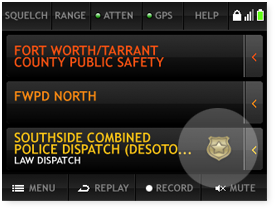
On Screen Examples![Agency information display]() | AGENCY INFORMATION
See the agency, department, and channel you are monitoring at a glance. |
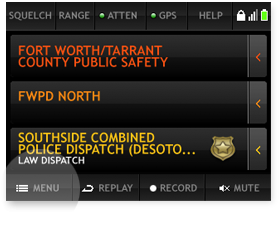
![On-screen controls]() | ON-SCREEN CONTROLS
Quickly access the features you use most. Tap to apply settings or open menus. |
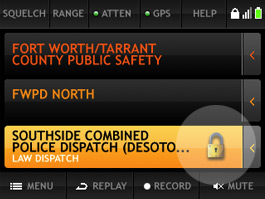
![Quick hold feature]() | QUICK HOLD
Tap a system, department, or channel to listen only to that selection. Tap again to return. |
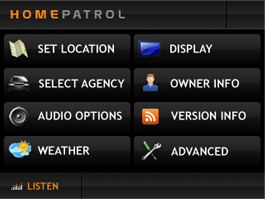
![Easy navigation menu]() | EASY-TO-NAVIGATE MENUS
Quickly find and adjust the settings you need. |
![Setup options]() | MULTIPLE SETUP OPTIONS
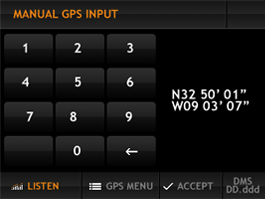
Set your location by zip code, city, GPS, or coordinates. The scanner can also auto-detect location for fast setup. |
![Channel selection]() | HEAR WHAT YOU WANT
Choose the types of agencies you want to monitor. Listen to police, fire, EMS, and more based on your preferences. |