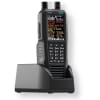
The SDS150 is Uniden’s most advanced digital scanner yet. Uniden is the first company to utilize True I/QTM Technology for exceptional performance in simulcast areas. Now with added features like a built-in GPS receiver, charge cradle, and support for the U/AWARE app, the SDS150 takes field-ready scanning to the next level. Built tough for real-world use, the SDS150 is water-resistant to JIS4/IPX4 standards and packed with powerful tools for serious monitoring.
$
Stock Status: In Stock
This product qualifies for FREE SHIPPING!
Free Shipping applies to the Contiguous United States
Product Code: 10-502090
Custom Field 1:: live
Choose your options:
List your area(s) in the box below ONLY if you have chosen setup from the pull down above.
List your counties in the box above
Add now and save 10%
Add now and save 10%
Add now and save 10%
Add now and save 10%
Add now and save 5 %
Add now and save 10%
Uniden Bearcat SDS150 Police Scanner
The All New Uniden Bearcat SDS150 - The latest evolution in scanner technology.
*Supplies are Limited
If you like the SDS100 you will absolutely love the SDS150! With many new and improved features, the SDS150 is the ultimate scanner, particularly for those in digital simulcast areas.
Very simple to operate, you can be up and running in 3 minutes or less. No programming needed, just your zip code. Once your Zip Code is entered, the SDS150 will load Police, Fire and EMS channels in your area. Superior Simulcast performance and a huge color display makes this the premier handheld scanner available!
The Uniden Bearcat SDS150 is a modern handheld digital police scanner designed for reliable monitoring of today’s P25 Phase I/II and trunked radio systems. Built with advanced digital decoding and strong simulcast performance, it delivers clear, consistent audio and fast, organized scanning for real-time situational awareness at home or on the go.
The SDS150 is Uniden’s most advanced digital scanner yet. Uniden is the first company to utilize True I/QTM Technology for exceptional performance in simulcast areas. Now with added features like a built-in GPS receiver, charge cradle, and support for the U/AWARE app, the SDS150 takes field-ready scanning to the next level. Built tough for real-world use, the SDS150 is water-resistant to JIS4/IPX4 standards and packed with powerful tools for serious monitoring.
The SDS150 includes the entire RadioReference database covering the USA and Canada, allowing one to monitor local activity merely by knowing the location, either by the local ZIP Code, or now, using the built-in GPS. Merely select the service type (Police, fire, rail, air etc.) of communications you want to listen to and the SDS150 does the rest! And, of course, you can do your own customized programming as well directly or via the included software.
Fast shipping, expert programming available, and U.S.-based scanner support for reliable performance anywhere you go. Here are some of the new and improved features of the Uniden SDS150:
Built in GPS receiver No more messy cables and extra-cost GPS receivers.
Built in Bluetooth Connect to your smart phone for full control and access to the scanner.
240x320pixel color display Allows for a wide variety of display colors and configurations. Location and a huge variety of system, channel and trunking info is displayable and customizable by the user.
Computer or direct programming If you want to do more local or detailed programing, you can do so directly from the keyboard or with the free Sentinel software.
“Waterfall” graphic display For viewing activity on either side of an active frequency included at no extra cost.
New Uniden “U/Aware” app For iOS and Android allows you to connect to the scanner for listening and remote control.
Improved access to the SD Card The SD Card (which holds the programming memory) is now easily accessible from the side of the radio.
New and improved battery pack. Using more robust lithium-ion cells. New desk stand/charger The SDS150 comes with a drop-in desk stand/charger that can charge the battery when attached to the radio as well as a separate slot for a detached battery (charge via USB-C).
Includes Superior P25 digital Reception With SDR performance and has optional (extra cost) DMR, NXDN and ProVoice digital modes. CloseCall Nearfield reception Find strong local communications, even if you don’t know the frequency. What Comes In the box
Q: What systems can the SDS150 receive? A: The Uniden Bearcat SDS150 is designed to receive modern public safety radio systems, including P25 Phase I and Phase II, as well as many trunked and conventional systems. In most areas, this allows you to monitor local police, fire, EMS, and other services, as long as the communications are not encrypted.
Q: Will the SDS150 work in my area? A: The SDS150 performs especially well in areas using simulcast digital systems, where many older scanners struggle. If your local agencies use P25 digital systems and are not encrypted, the SDS150 is one of the most reliable handheld options available. If you’re unsure, our team can help confirm compatibility for your location.
Q: Is the SDS150 difficult to set up and use? A: The SDS150 is designed to be user-friendly, with features like location-based scanning and database-driven programming to simplify setup. Many users can get started quickly, and optional programming services are available if you prefer a ready-to-use setup right out of the box.
About our Set-up & Optimize Service
Professional Programming for Your SDS150 Get your scanner set up the right way from the start.
Programming is the most important step in getting the SDS150 to perform properly. While the scanner is powerful, it relies on accurate data, correct system setup, and proper filtering to deliver clear, usable results.
Our expert programming service ensures your scanner arrives ready to use for your specific area, without the frustration of trial and error.
What We Do We customize your SDS150 based on your location and listening preferences:
Program local police, fire, EMS, and public safety systems
Configure trunked and digital P25 systems correctly
Build organized Favorites Lists for easy navigation
Apply proper settings to improve clarity and performance
Update the full database and install the latest firmware
Your scanner is set up so you hear what matters, not everything.
Why Professional Programming Matters Out of the box, scanners can pull in a large amount of data, much of it irrelevant. This often leads to missed transmissions, cluttered scanning, or confusion during use.
We take the time to:
Filter out unnecessary systems
Prioritize important local communications
Organize everything into simple, easy to use lists
The result is a scanner that works the way you expect it to.
Can You Program It Yourself? Yes, and many experienced users choose to.
The SDS150 uses Uniden Sentinel software, which allows you to manage systems, update the database, and customize your setup. However, there is a learning curve, especially when working with modern trunked and digital systems.
If you prefer a faster, frustration free experience, professional programming is the easiest way to get started.
Ongoing Support If you ever need help after your purchase, our team is here to assist. Whether you have questions about your setup or need guidance making changes, we are available to help you get the most out of your scanner.
Processing Time This service will add approximately 7 to 14 business days for processing before the radio will be shipped.Features
• True I/QTM Scanner: Exceptional digital performance in simulcast areas • Built in GPS Receiver • U/Aware App Connectivity: Smartphone connectivity via Bluetooth® low energy (BLE) • Multi-System Support: • TrunkTracker X • APCO P25 Phase I & II • Motorola, EDACS, LTR • DMR Tier III*, Hytera XPT*, Single-Channel DMR* • NXDN 4800/9600*, EDACS ProVoice* • Location-Based Scanning with USA/Canada radio database • Charge Cradle with extra battery charging slot (Extra battery sold separately) • Recording, Playback, & Replay • Bright, High-Visibility Color LCD with Full Color Customization • Waterfall Feature Included • Close CallTM RF Capture • Custom Alerts & Favorites Lists • USB Type-C® Charging & PC Programming • Rugged & Water-Resistant (JIS4/IPX4) • Fire Tone-Out & S.A.M.E. Alerts • Preemptive & Priority Trunking • Enhanced Memory & Dynamic Channel Management • MicroSD Card Installed (Expandable) • Weekly Database Updates via Sentinel Software • Backlit Keypad & Soft Keys for Intelligent User Interface • Lithium-Ion Battery Pack Included • Frequency Coverage: 25–512 MHz, 758–824 MHz, 849–869 MHz, 894–960 MHz, 1240–1300 MHz
** Paid Upgrade required. Upgrade might not be available upon initial release. Sentinel Software Programming - Download Software
The Uniden Sentinel software makes programming your SDS150 simple and flexible, even if you’re new to scanners. You can easily update the radio’s database, create and customize Favorites Lists, and manage what systems you want to monitor. It’s the best way to keep your scanner current and tailored to your area, giving you more control and better performance than basic setup alone.
Learn how to operate the Uniden Sentinel Software: