|
Screen Shots and Overview
As you probably noticed setting up a memory bank using the keyboard is very time consuming because of bad ergonomics (IF Bandwidth is a Shift option). Every memory channels holds 24 parameters(!). My ARC5000 Memory Manager reads all these parameters and presents them in a friendly spread-sheet format.
The program offers:
- "webcatcher"!
- Edit of all memory parameters (ARC5000 is the only software that programs CTCSS!)
- Cut/Copy/Paste Options with Clipboard support
- Cut/Copy/Paste complete mem.channel data
- Only ARC5000 reads and writes CTCSS without removing them from your memory bank
- Link an offset to your memory channels. ARC reads the actual offsets you programmed.
- Sort option
- Edit the scan parameters (delay,pause,voice,level)
- Edit the bank link settings:
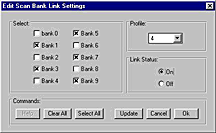
- Right Mouse Button Popup menu
- Insert/Remove Channels
- Easy fill option for setting up a bank in a few mouse clicks:
Here a list of parameters the current version (also the demo) reads from the AR5000:
- Frequency
- Mode
- Automode
- IF-Bandwidth
- Step
- Step adjust
- Step adjust Shift
- Audio Low Pass Filter
- Audio High Pass Filter
- Audio FM De-emphasis
- Audio Tone elimination
- Text
- Antenna
- ATT
- CTCSS frequency (Only ARC5000 reads and writes the CTCSS data!)
- Pass
- Select
- AGC
- DTMF On/OFF
- Offset reference
- Front end tune (read only)
- Sub step (read only)
- Step-adjust (read only)
AR5000 Bandplan Manager:
The AR5000 has a nice future called AUTOMODE. In AUTOMODE the receiver uses a table as a reference for setting mode/step/bandwidth/step offset. Unfortunately this pre-programmed bandplan does not match your local bandplan. This tool is used to reprogram your bandplan. The data is read from the EEprom and presented in a spread-sheet format. You can add/remove/modify entries in the table and send the new data back. A maximum of 128 entries is available.
Other futures:
- Open a bandplan from disk
- Save a bandplan
- Link an offset to your bandplan
- Add text to the bandplan
- View the offsets programmed in your AR5000
- The software includes the USA and Europe bandplan that came with the AR5000. Use these to build your personal bandplan.
AR5000 Virtual Control Center
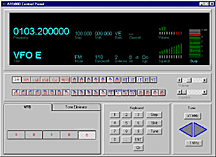
This new tool introduces the first virtual AR5000 control. The window is divided in 3 sections.
The top section is the virtual display showing more info then the AR5000 display itself. It shows all the current settings including volume/squelch/s-signal.
The middle section is a large toolbar were you can select Mode/Bandwidth/Antenna/Audio Filters/AGC and setup Volume and Squelch.
The bottom section is used to input new data. Program the frequency/step/shift using a virtual keyboard. Also tuning the AR5000 is possible. You can also setup the tone eliminator.
The virtual control center will get support for memory and search banks in the future.
The famous ARC spectrum analyser is also available for the AR5000. See other site for info and more screenshots. The spectrum analyser includes cumulative, continue and single peak mode. A powerful ZOOM option let's you zoom in at a certain range with a few mouse clicks. The 5000 is automaticly updated with the new search range. A hit spectrum and extended log options are also available. You can setup all colors and horizontal/vertical lines. The EASY LISTENING option tunes the 5000 to a received frequency by double clicking a peak in the Spectrum.
ARC5000 includes the spectrum analyser software too.
Here is a screen shot of spectrum analysis I did of a cellular band in The Netherlands using ARC5000:
Setup your search banks. The data is presented in a spread-sheet window like the memory manager.
Here are some options
- Full copy/paste/cut support
- Sort the 20 search banks
- Save data to disk
- Read data from disk
- Setup the search parameters (delay,pause,voice,level)
- Setup the bank links
- Program special steps with a shift
- Edit the pass frequencies:
|





